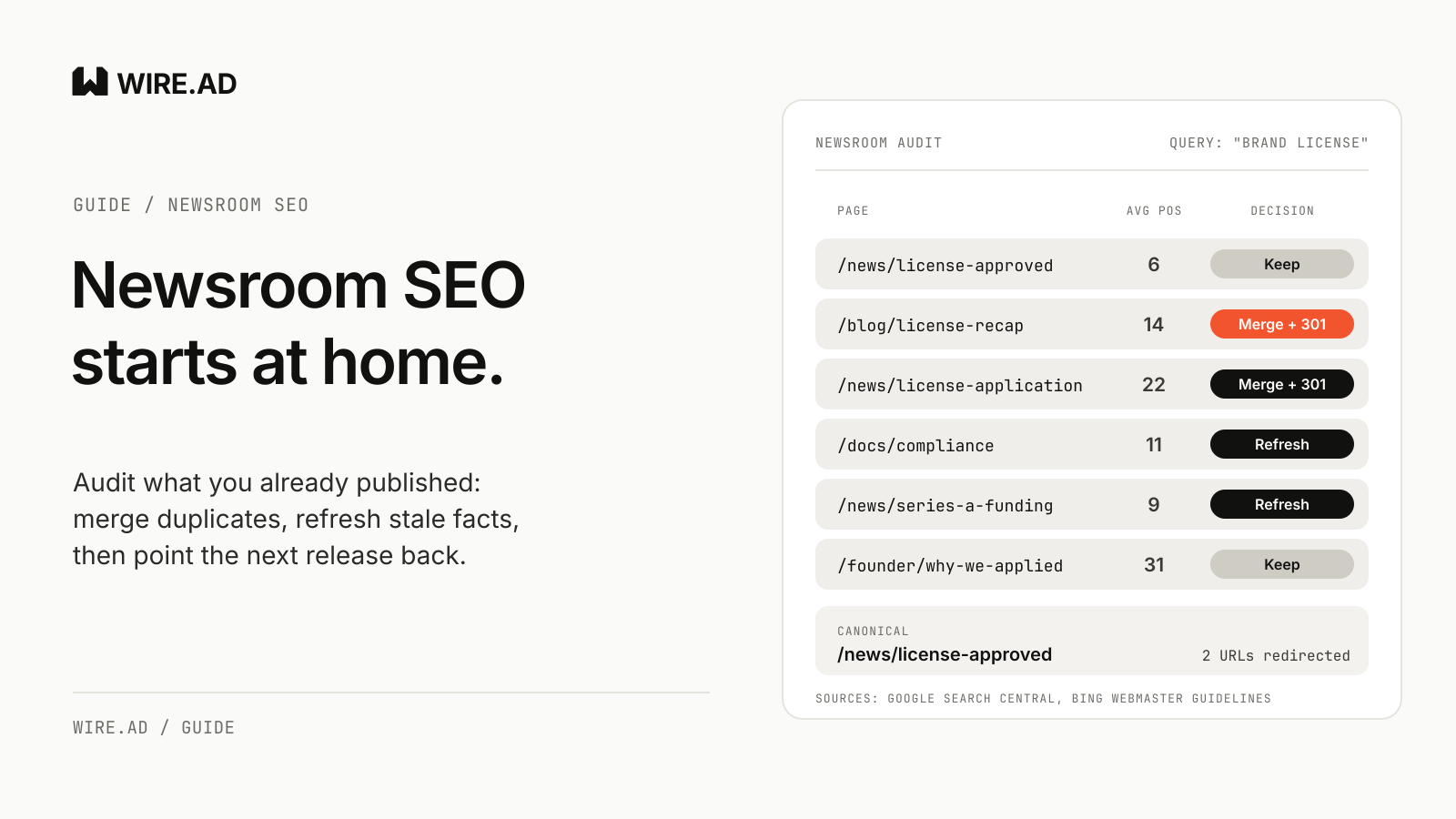
Newsroom SEO starts with the pages you already published. Before you pay for the next press release, audit your newsroom, old releases, product and docs pages, and founder posts for four problems: several pages competing for the same brand or product query, numbers that went stale, near-duplicate announcement pages, and pages that sit just below page one. Merge the duplicates into one canonical page per announcement topic with a 301 redirect, refresh the pages closest to ranking, and make the next release link back to them.
The order matters most for crypto, fintech and AI companies, which announce often: a token listing, a license, a funding round, a model update. Each one gets a newsroom page, a blog recap, a founder thread and a docs entry. Two years later the site holds six versions of the same story, and search engines have to guess which one represents the company.
Pull the query and page data first
Open the Search Console Performance report. By default it shows “click and impression data for your site in Google Search results for the past three months.” Widen the date range, then switch between the Queries and Pages tabs.
You are looking for two things. The first is every query that contains your brand, product or token name, with the pages that appear for it. The second is pages with plenty of impressions and few clicks. Google’s own help text suggests exactly this check: “Look for high impression, low CTR pages,” then review whether the titles and snippets “accurately answer the question.”
Export both views to a sheet with one row per URL from your newsroom, blog, docs and press archive. Add columns for its queries, average position, the date its facts were last checked, and a decision.
That sheet is the audit.
Find the pages competing for one announcement
Filter the Performance report to a single brand or product query and open the Pages tab. If three or four URLs collect impressions for “[product] launch” or “[company] license,” those pages are splitting attention between them.
Google describes what happens next. When it finds “multiple pages that seem to be the same or the primary content very similar, it clusters them together,” then picks one as canonical. “The canonical page will be crawled most regularly; duplicates are crawled less frequently.” If you leave the choice to Google, the page it picks may be the 2023 recap with the old fee schedule.
Bing is more direct about the cost. Its webmaster guidelines say “duplicate URLs dilute signals and reduce Bing’s confidence in selecting a URL for grounding results or citations.” Grounding is the step where Copilot pulls a page in as a source, so four overlapping pages give it four weak candidates.
Mark every cluster in your sheet and name the page that should survive, usually the one with the most complete facts or the best average position.
Check every number and date against today
Stale facts are the quiet problem in a newsroom. A release from last year still says the license application is pending, though it was granted in spring, and journalists and AI answers can quote that page as current.
Google’s self-assessment questions for helpful content include a plain one: “Does the content have any easily-verified factual errors?” Bing’s guidelines ask site owners to “remove or revise outdated information to prevent incorrect information from surfacing.”
Go through each surviving page and list every figure, status and claim that can change: user counts, volumes, supported chains or markets, regulatory status, model names, pricing tiers, team titles. Confirm each one with the person who owns it.
Then decide how to show the change. For an old release, a dated note at the top often works better than silently rewriting the body, because the original announcement stays accurate as a record of what was said that day. Our guide to press release corrections covers how to word that note.
Dates need the same care. Google says byline dates “must describe the publication or update date of the page, not the stories or events described therein,” and recommends labels such as “Last updated.” It also lists, among warning signs of search-engine-first content, “changing the date of pages to make them seem fresh when the content has not substantially changed.” Update the date only when the facts on the page actually changed.
How WIRE.AD does it. Every name, number and status in a release is confirmed with the client before anything goes live, so each outlet version carries the facts that are true on launch day.
Merge duplicates with a 301 and one canonical page
Move anything useful from the weaker pages into the survivor, then retire them.
Google ranks its canonical signals by strength. Redirects are “a strong signal that the target of the redirect should become canonical.” A rel="canonical" link is also strong, and sitemap inclusion is “a weak signal.” The same page adds that these methods “can stack and thus become more effective when combined.” For a page you are retiring, Google’s comparison table is specific: use permanent redirects “only when deprecating a duplicate page.”
So the pattern for each retired URL is a server-side 301 to the surviving page, a self-referencing canonical on the surviving page, and an updated sitemap. Bing’s guidelines line up with this: sitemaps should “list only canonical URLs” and “remove deleted or redirected URLs promptly,” and when content moves, “use 301 redirects for permanent URL changes.”
Teams usually worry about lost link value. Google’s site move guide says “301 and other permanent redirects don’t cause a loss in PageRank.” On timing, the same guide says: “Keep the redirects for as long as possible, generally at least 1 year.”
Pages with no useful content left and no surviving equivalent can return a 404 or 410 instead of a redirect.
After the merge, update your own internal links to point at the canonical URL. Google asks for this directly: “When linking within your site, link to the canonical URL rather than a duplicate URL.” If the old releases also live on third-party sites, the syndication and canonical URL guide explains what to ask those publishers for.
Refresh the pages closest to page one first
Sort the sheet by average position and impressions. Pages that already rank somewhere on the second page for a query you care about need less work to move than pages with no visibility at all. A working range of roughly position 8 to 20 is a sensible place to start, though the right cutoff depends on how many pages you have.
For each of those pages, compare the page with what people searched. If the query is “[company] proof of reserves” and the page is a 2024 release about a partnership that mentions reserves once, the page does not answer the question. Either add a clear, dated section that does, or point that query’s internal links to a page that already does.
Bing’s guidelines put the test plainly: pages should “fully satisfy user intent,” and each URL should focus on a single topic.
When a refreshed page goes live, tell the search engines. Bing recommends IndexNow to notify it when URLs are added, updated or removed, which it says helps “reduce outdated or incorrect URL references in Copilot responses and grounding results.” Submit the refreshed pages and the retired URLs together.
How WIRE.AD does it. Clients can add a before-and-after AI visibility reading to a campaign. Before launch, WIRE.AD records which brands AI answers name for the questions the client’s buyers ask, and after the placements go live the same questions are asked again.
Make the next release link back
The audit pays off when the next announcement goes out. A new release about a product update should link to the canonical product page and the canonical page for the previous related announcement. It should not create a seventh page on the same topic.
The owned page holds the history; the release carries the new fact and sends readers there. Check those links a few weeks after distribution, since republished copies sometimes strip or rewrite them. The press release link maintenance guide covers that check.
How WIRE.AD does it. We write a separate version of the release for each desk, and the client gets a report with each live URL and every placement labeled editorial or sponsored.
A newsroom SEO audit checklist
| Check | Where to look | Decision |
|---|---|---|
| Several URLs get impressions for one brand or product query | Search Console, Queries tab filtered by query, then Pages | Pick one survivor, merge the rest with a 301 |
| Numbers, statuses or titles changed since publication | Each surviving page, confirmed with the owner of each fact | Refresh, add a dated note, update the “Last updated” date |
| Near-duplicate announcement pages (release, blog recap, docs entry) | Site search and your URL sheet | Keep the most complete page as canonical |
| Average position about 8 to 20 on a query you care about | Pages tab, sorted by position and impressions | Refresh first |
| High impressions, low clicks | Queries and Pages tabs | Rewrite title and opening to answer the query |
| Retired URLs still in sitemap or internal links | Sitemap file, internal link crawl | Remove from sitemap, relink to canonical |
| Changed or retired URLs not yet submitted | IndexNow log | Submit updated and removed URLs |
Run the audit once in full, then repeat the query check before each release. When the next announcement is ready, send a brief, and its versions can point readers to the canonical pages you kept.